Professional Training Guidelines - Effective Use of Google Meet for Live Classes & Sessions
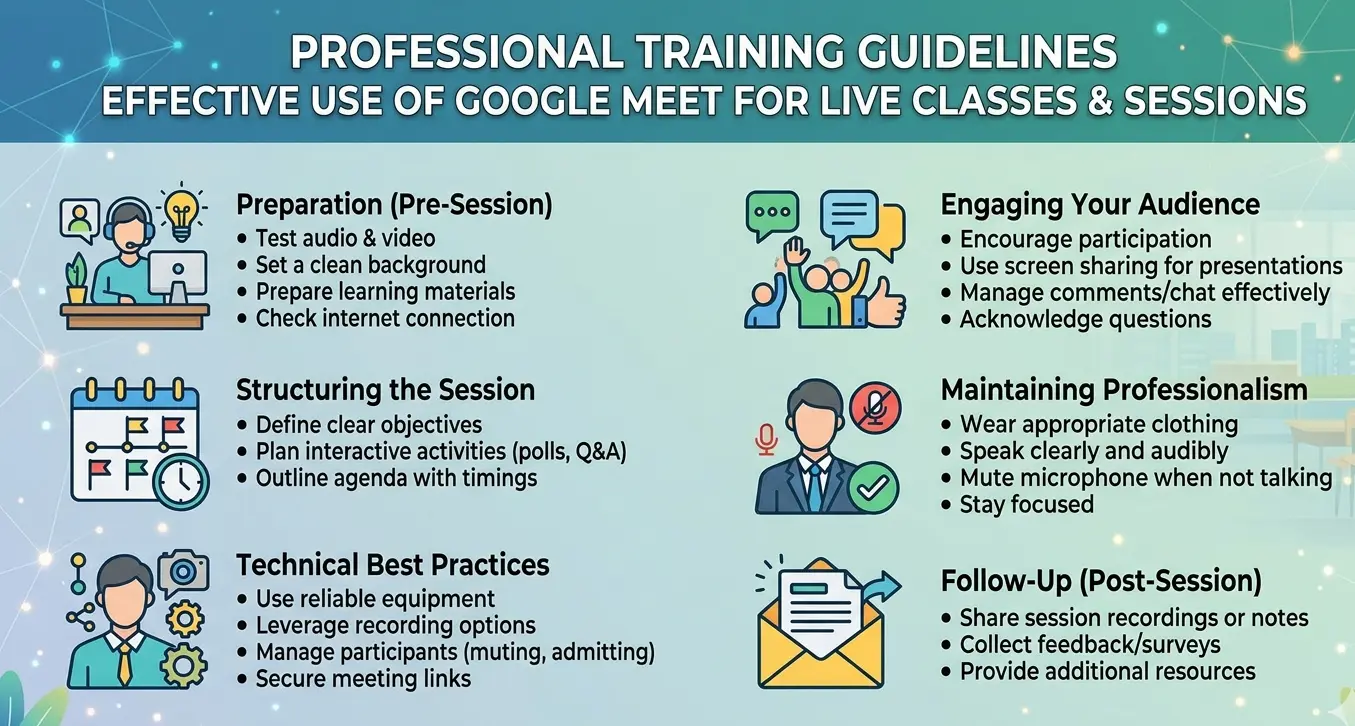
Published: March 20, 2026

INTRODUCTION
In the era of digital transformation, virtual classrooms are no longer optional—they are essential. The effective use of Google Meet can transform traditional teaching into an interactive, disciplined, and result-oriented learning experience. These guidelines are designed to ensure professional excellence, student engagement, and academic productivity.
SECTION 1: STEP-BY-STEP GUIDELINES FOR TEACHERS
Step 1: Technical Preparation
- Use an official institutional Gmail account
- Ensure a stable internet connection (minimum 10 Mbps recommended)
- Test microphone, camera, and speakers
- Keep backup such as mobile internet or device
Step 2: Scheduling and Creating the Session
- Open Google Meet
- Click "New Meeting" to schedule or start an instant meeting
- Generate meeting link and share via official WhatsApp groups, LMS or school portal, and email communication
- Clearly mention class name, date and time, and instructions
Step 3: Pre-Class Academic Readiness
- Prepare lesson plan, presentation (PPT/PDF), and activities or questions
- Define learning objectives and time allocation
- Keep digital resources ready for screen sharing
Step 4: Professional Class Initiation
- Join 5 to 10 minutes before time
- Welcome students professionally
- Take attendance
- Establish rules such as microphone muted and camera on if possible
- Create a respectful and disciplined environment
Step 5: Delivering an Engaging Lesson
- Use screen sharing effectively
- Explain concepts clearly and confidently
- Break lecture into small segments of 10 to 15 minutes
- Use questions, examples, and real-life applications
- Encourage interaction through chat and verbal responses
Step 6: Classroom Management and Control
- Mute disruptive participants
- Use names to engage students
- Maintain eye contact via camera
- Ensure no distractions and active participation
Step 7: Assessment and Engagement
- Ask quick questions during the session
- Assign short tasks
- Conduct mini quizzes, either oral or chat-based
- Monitor student responses
Step 8: Effective Session Closure
- Summarize key points
- Highlight important concepts
- Assign homework or tasks
- Address student queries
- End session professionally
Step 9: Professional Ethics and Best Practices
- Do’s: Be punctual and consistent, maintain professional attire, use clear and moderate voice, stay organized and focused
- Don’ts: Avoid background noise, do not ignore students, avoid overloading content, never start class unprepared
SECTION 2: STEP-BY-STEP GUIDELINES FOR STUDENTS
Step 1: Technical Readiness
- Use a fully charged device
- Ensure stable internet
- Keep notebook, books, and pen ready
- Sit in a quiet and clean environment
Step 2: Joining the Session
- Click the link provided by teacher
- Join with real full name
- Join 5 minutes before class time
Step 3: Classroom Discipline
- Keep microphone muted
- Turn camera on if instructed
- Sit properly and attentively
- Avoid distractions
Step 4: Active Participation
- Listen carefully
- Take notes
- Raise hand before speaking
- Use chat for questions
- Respond when asked
Step 5: Learning Responsibility
- Stay focused throughout the session
- Do not leave without permission
- Follow teacher instructions
- Respect teacher and classmates
Step 6: Post-Class Responsibilities
- Revise the lesson
- Complete homework
- Prepare for next session
- Ask questions if unclear
Step 7: Student Code of Conduct
- Do’s: Be punctual, be respectful, be attentive, be responsible
- Don’ts: No misuse of chat, no disturbance or noise, no fake names, no unethical behavior
PERTC TRAINER’S FINAL MESSAGE
Technology is not just a tool—it is a gateway to excellence. A successful online class depends on discipline, preparation, engagement, and professionalism. When teachers lead with excellence and students respond with responsibility, digital learning becomes powerful, productive, and transformative. Powered by PERTC – Building Future Leaders Through Smart Learning